Monday, 22 April 2019

AT&T and Sprint Settle Lawsuit Over Misleading '5GE' Label for AT&T's 4G Network


AT&T and Sprint have settled a lawsuit that Sprint levied against AT&T for its misleading "5G Evolution" or "5GE" branding that AT&T uses for its upgraded 4G LTE network.

A spokesperson for AT&T today told Law360 that the matter has been "amicably settled." Details on the terms of the settlement have not been shared, but AT&T is planning to continue to use its 5GE branding.


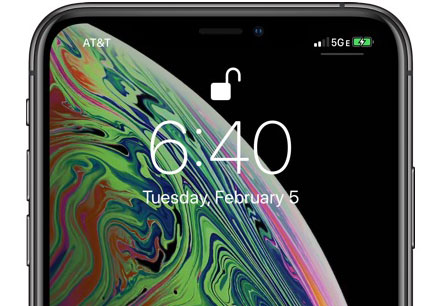
AT&T earlier this year began displaying a 5GE icon on some iPhone and Android smartphones. 5GE is AT&T's misleading name for an enhanced 4G LTE network and is not actual 5G connectivity, which incensed Sprint.


After AT&T rolled out the 5GE terminology, Sprint filed a lawsuit in federal court against AT&T in an attempt to prevent AT&T from using 5GE labeling. Sprint accused AT&T of damaging the consumer reputation and understanding of true 5G and potentially hurting Sprint's planned 5G rollout this summer.


Sprint also took out a full page ad in The New York Times to call AT&T out for the misleading labeling, calling 5GE "fake 5G." From Sprint's ad:

While Sprint is working hard to deliver mobile 5G and the first 5G smartphone in the U.S., AT&T is hard at work trying to convince you that they already won the race to 5G with something they call "5G Evolution." That is simply untrue.


Don't be fooled. 5G Evolution isn't new or true 5G. It is fake 5G.


They would love for you to believe they are different ... better. The truth is AT&T is simply offering customers a nationwide 4G LTE network just like Sprint and all the other major wireless carriers. It's not 5G.

AT&T uses 5GE for its 4G LTE networks that offer features like three-way carrier aggregation, 256 QAM, and 4x4 MIMO to provide faster connection speeds to consumers. These features are in no way limited to AT&T and are offered by other carriers, but no other carrier is using fake 5G branding.


Unsurprisingly, speed tests have confirmed that AT&T's 5GE service is no faster than LTE from Verizon and T-Mobile.


AT&T has defended its 5GE branding by calling 5G Evolution "first step on the road to 5G" and by claiming that customers "love" the 5GE branding because they "want and deserve to know" when "better speeds" are available.

"We understand why our competitors don't like what we are doing, but our customers love it. We introduced 5G Evolution more than two years ago, clearly defining it as an evolutionary step to standards-based 5G. 5G Evolution and the 5GE indicator simply let customers know when their device is in an area where speeds up to twice as fast as standard LTE are available. That's what 5G Evolution is, and we are delighted to deliver it to our customers.

Smartphones that support true 5G connectivity are only now just beginning to trickle out, and Apple isn't expected to launch one until 2020. No existing iPhone will be able to connect to a 5G network because it requires new hardware. Sponsor ads:

Gihosoft RePicvid Free Photo Recovery Software provides a free photo recovery software for windows to help users recover the deleted or lost photo for free.

If you lost data after you updated to a new iPhone, you can always use Gihosoft iPhone Data Recovery to get the data back from the old iPhone or backup.You may also like: iphonerecovery.com

If you use android phones, please choose Gihosoft Android Data Recovery.With Gihosoft Android Data Recovery, no longer afraid of data loss!

5G networks from the four major carriers in the United States are going to be available starting in 2019, but expanded coverage and full rollouts will take some time.

Thursday, 4 April 2019

Pokémon GO Fest Will Host Three Events Around the Globe This Year

Pokémon GO Fest Will Host Three Events Around the Globe This Year


Last year, Niantic and The Pokémon Company hosted its Pokémon GO Fest in Chicago, Illinois, while launching Safari Zone events in two additional cities internationally. This year will be different, as the Pokémon GO Fest 2019 is an international affair through and through.

This week, Niantic and The Pokémon Company officially announced that the 2019 Pokémon GO Fest will take place in three international cities over the course of the summer, rather than just one in the United States and smaller events in other cities. Things will kick off in Chicago, Illinois, again, with the event starting on Thursday, June 13 and run until Sunday, June 16. It will once again be hosted in Chicago’s Grant Park, the site of the very first Pokémon GO Fest.

At the park, there will be physical installations to check out, plenty of merchandise, and “Team Lounges” where players in the Valor, Mystic, and Instinct teams can get food and refreshments together. There will be unique photo opportunities with the digital pocket monsters around the park as well, and new Special Research efforts so players can team up and “unlock exciting rewards”.

Niantic is changing the way they sell tickets to the event this year. The developer says it will be selling tickets directly through the Pokémon GO mobile app, and that will go live later this month.

Beginning Thursday, July 4, and running until Sunday, July 7, Pokémon GO Fest will be hosted in Dortmund, Germany. It will be hosted in the Westfalenpark. Niantic chose this same site last year with its Safari Zone, but this year’s event should be a much bigger deal — especially considering it runs for four days. It will have the same kind of events that the Chicago fest will have. Tickets go on sale “later this spring”, but no exact date is known at this time.

There is a third event, which take place at an unknown time and unknown location somewhere in Asia. However, considering we’re seeing Niantic use the previous event sites from last year for this year’s Pokémon GO Fest, it’s possible the third location is Yokosuka, Japan. It’s also possible the developer and The Pokémon Company are still locking down a venue, so that may not be the case.

As is par for the course, Niantic says that folks who can’t attend any of the events will still be able to take advantage of special events in the game while Pokémon GO Fest is taking place.
Our Take

Pokémon GO is still a fun game. And Niantic continues to add new features, including a new photography mode and player-versus-player battles, to mix things up. These fan events are still incredibly popular, too. It’s good to see the game still has a healthy player base, even if the initial hysteria has certainly died down.
We Want To Hear From You

Have you ever attended one of these events? If not, and you live near where one of the events will take place this year, do you plan on going?

[via Niantic]

Sponsor ads:

Gihosoft Free iPhone Data Recovery:https://www.gihosoft.com/iphone-data-recovery-free.html

Gihosoft iPhone Data Recovery Free

Free iPhone Data Recovery Software for Windows/Mac

Recover up to 12+ types of files, including contacts, SMS, photos, WhatsApp, Viber, notes, etc.

Restore lost data from iOS devices directly or from iTunes and iCloud backup

Recover iPhone data lost due to iOS upgrade/jailbreak, accidental deletion, device lost or broken

Support all the latest iPhone, iPad and iPod Touch

Both Free and Pro version.

If you lost data after you updated to a new iPhone, you can always use Gihosoft iPhone Data Recovery to get the data back from the old iPhone or backup.You may also like: iphonerecovery.com

If you use android phones, please choose Gihosoft Android Data Recovery.

With Gihosoft Android Data Recovery, no longer afraid of data loss!

Must read:Youtube video downloader for pc

Gihosoft RePicvid Free Photo Recovery Software provides a free photo recovery software for windows to help users recover the deleted or lost photo for free.

Jihosoft Android Data Recovery: the best Android Data Recovery software for Windows and Mac to recover deleted contacts, messages, photos, videos, WhatsApp and etc from Android devices.Tips:How to transfer messages from iPhone to iPhone

Jihosoft File Recovery:Recover deleted, Lost, formatted, or corrupted files from PC, flash drive and memory card easily & safely

Also Read:Update Android

Also Read:Top 8 Best Alternative Websites to TamilGun in 2019

Also Read:Free Download FRP Bypass APK for Android 2019

Also Read:Best 10 Movie4k Alternative Websites for Movie Streaming 2019

Also Read:Top 32 Best Proxy and Mirror Sites to Unblock Fmovies 2019

Also Read:Best Torrent Search Engine Sites to Find Your Favorite Torrents 2019

Also Read:5 Best Sites Serving as Alternatives to TheWatchSeries Online 2019

Also Read:Top 6 Best Alternative Websites to Torlock For You 2019

Also Read:Download Latest Samsung USB Drivers for Mobile Phones on Windows

Also Read:take a screenshot on any Android phone

Also Read:Convert Video to GIF Free with Top 5 Free Video to GIF Converters

Also Read:Add Timestamp to Photos on Windows/Mac/Android/iPhone

Also Read:iPhone Manager

Wednesday, 20 March 2019

Apple Launches New Spring Colors for iPhone Cases and Apple Watch Bands


Apple Launches New Spring Colors for iPhone Cases and Apple Watch Bands
Just hours after Apple unveiled new second-generation AirPods with "Hey Siri" support and a new Wireless Charging Case, they've started selling out.


At launch, Apple listed a U.S. delivery date of March 27 to March 29 for the new $199 AirPods paired with the Wireless Charging Case, but now, those delivery estimates have slipped to April 2 to April 5.
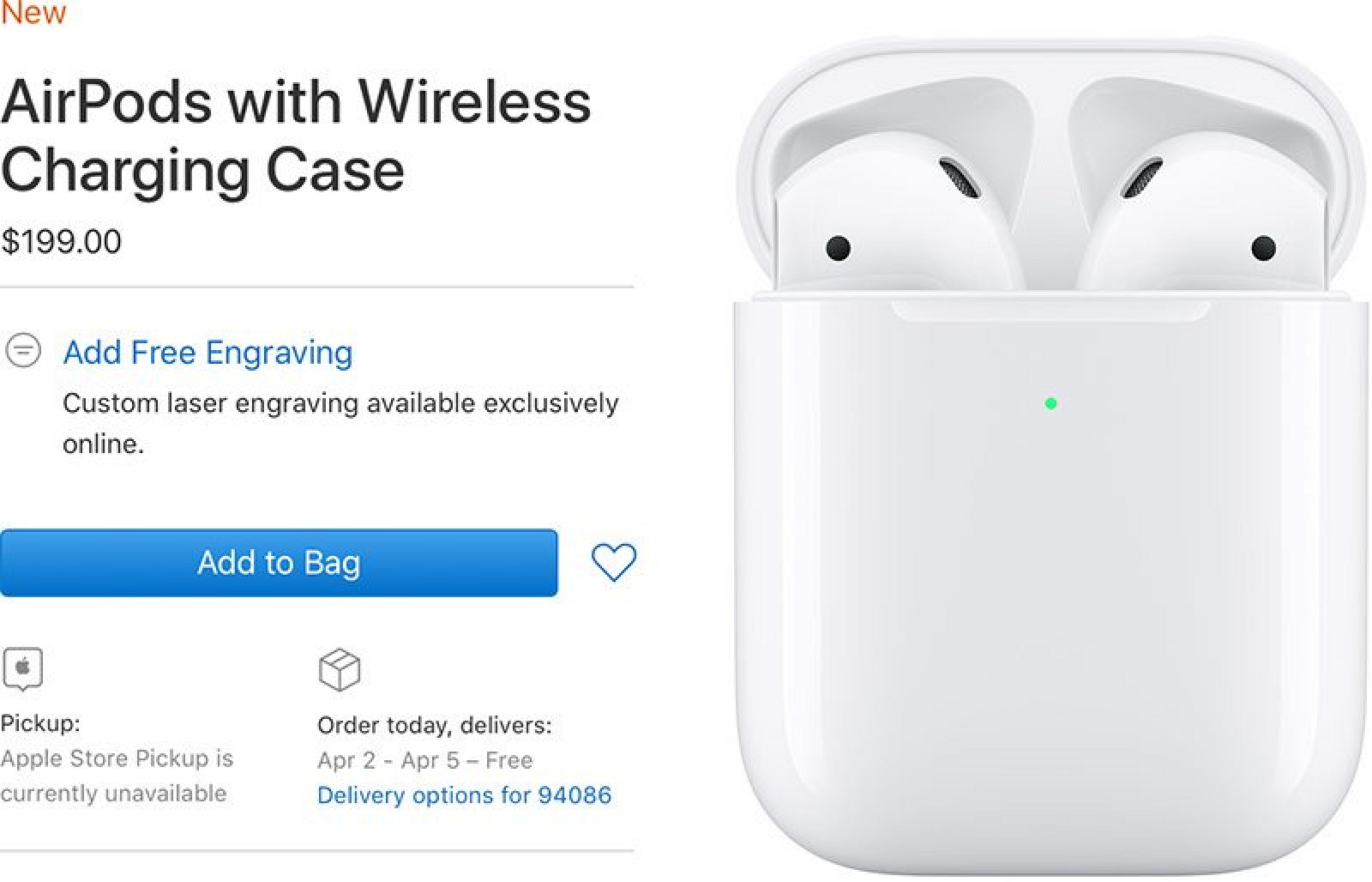


The $159 second-generation AirPods with a standard Charging Case continue to be available for March 27 to March 29 delivery, as does the standalone $79 Wireless Charging Case Apple introduced for current AirPods owners.


Those who want to pick up the new AirPods with Wireless Charging Case should do so soon, as historically, Apple has had trouble keeping its AirPods in stock due to high demand.


We may soon see these delivery estimates slip even further into April.


Apple's new second-generation AirPods do not bring exciting new features that were rumored like a new black color and health updates, but they're a solid upgrade over the previous version.


There's a new H1 wireless chip inside that powers hands-free "Hey Siri" functionality so you don't need to tap to access the voice assistant.


Your AirPods are able to switch between devices two times faster when playing music, and there's an extra hour of talk time, bringing total talk time to three hours.


The new Wireless Charging Case allows the AirPods to charge using Qi-based wireless charging accessories, and it perhaps heralds the upcoming launch of the AirPower.


Apple is designing its own wireless charging mat meant to charge AirPods, the iPhone, and the Apple Watch all at once, but it's not yet entirely clear when it will launch given the many delays since its 2017 introduction.


In the meantime, with no AirPower, AirPods can charge on any Qi-based accessory that you might already have for your iPhone.


Apple will likely have some stock of the new AirPods models in its retail stores next week for those who were unable to order and receive a March delivery date. If you order online, though, you can get your AirPods case engraved, a feature new to the second-generation model.


We expect AirPods to be in stores right around March 25. The new AirPods require iOS 12.2, watchOS 5.2, and macOS Mojave 10.14.4, all of which are in beta testing right now. Those releases are expected on March 25, so AirPods could be in stores soon afterwards.


We're giving away a pair of AirPods to one lucky MacRumors reader, and you can enter to win in our AirPods roundup.


Related Roundup: AirPods 2

Tag: AirPods Guide

Buyer's Guide: AirPods (Buy Now)

124 comments


WSJ Says Apple Approved Production of AirPower Earlier This Year as Previously Rumored

Wednesday March 20, 2019 8:59 am PDT by Joe Rossignol

The Wall Street Journal today reports that Apple approved production of its long-awaited wireless charging mat AirPower earlier this year after facing challenges with developing the accessory. This supports previous supply chain rumors.


From the report:

The company earlier this year approved production of a wireless-charging pad called AirPower, according to people familiar with the matter. It had announced the product in late 2017.


AirPower, which would allow users to charge the new AirPods and an iPhone simultaneously, has been delayed by product-development challenges, the people said. Apple typically announces new products within months of beginning production.

Last month, reputable analyst Ming-Chi Kuo said the AirPower will launch in the first half of 2019 alongside new AirPods, which were announced today, but a specific release date is unclear. Kuo also expects a new iPod touch with a faster processor in the first half of this year, but there has been no sign of one so far this week.


Apple has announced new iPads on Monday, new iMacs on Tuesday, and new AirPods on Wednesday of this week, so it is possible the AirPower could follow on Thursday or Friday, but no reliable rumors have indicated that will be the case.


Apple initially said the AirPower would be released in 2018, but the year came and went without a release, and the company hasn't said a word about the mat in many months. Apple removed the last remaining reference to the AirPower on its website, a photo of the mat, from its AirPods page earlier today.


View image on Twitter


Joanna Stern

✔@JoannaStern

.@trippmickle with some AirPower details https://on.wsj.com/2CtKkPQ

13

11:27 PM - Mar 20, 2019

See Joanna Stern's other Tweets

Twitter Ads info and privacy


Apple is holding a media event on March 25 at Steve Jobs Theater, where it is widely expected to unveil news and streaming video services, but this week's product announcements suggest the event might not see much if any hardware on stage.


AirPower is designed to charge multiple Apple devices at once, including the iPhone 8 and newer, Apple Watch Series 3 and newer, and AirPods when they are placed in the new optional wireless charging case introduced today.


Tag: AirPower Guide

Show Full Article

74 comments


Roundup: AirPower Removed From AirPods Page, AirPods 3 Possibly 2020, iOS 12.2 Arrives Next Week, and More

Wednesday March 20, 2019 7:52 am PDT by Joe Rossignol

Apple today unveiled second-generation AirPods with a new H1 chip that enables hands-free Siri and up to an extra hour of talk time, and there are a handful of details worth mentioning surrounding the announcement.


Apple removed this AirPower image from its AirPods page today


Five thoughts:


The new AirPods require iOS 12.2, watchOS 5.2, or macOS 10.14.4 and later, which are all currently in beta testing. With the new AirPods arriving to customers early next week, this means the software updates should be publicly released on or around March 25 event day.


Apple removed an image of its AirPower wireless charging mat from its AirPods page today. However, many sources believe the AirPower is coming soon. Apple announced new iPads on Monday, new iMacs on Tuesday, and new AirPods on Wednesday, so it is possible the AirPower could follow on Thursday or Friday, but no reliable rumors have indicated that will be the case.


Apple has discontinued the original AirPods. The new lineup includes the second-generation AirPods paired with either a wired charging case for $159 or with a wireless charging case for $199. The wireless case is also sold separately for $79and is compatible with the original AirPods.


According to Mark Gurman, these AirPods were initially planned to go on sale last year. As he has previously reported, Gurman says Apple is working on a subsequent pair of AirPods with noise cancellation and water resistance that were originally planned for release later this year, but he now speculates that they could arrive in 2020.


MacRumors received a tip earlier this month claiming that Apple would announce new iPads, iMacs, and iPods on Monday, Tuesday, and Wednesday of this week, and while most of this information proved to be accurate, new AirPods ended up arriving on Wednesday instead of a new iPod touch. Multiple sources still expect a new iPod touch, but announcement timing is unclear.

For more details about the new AirPods, read our earlier coverage of the announcement.


Related Roundups: iOS 12, AirPods 2

Tags: AirPower Guide, AirPods Guide

Buyer's Guide: AirPods (Buy Now)

Show Full Article

107 comments


Apple Launches New Spring Colors for iPhone Cases and Apple Watch Bands

Wednesday March 20, 2019 6:23 am PDT by Mitchel Broussard

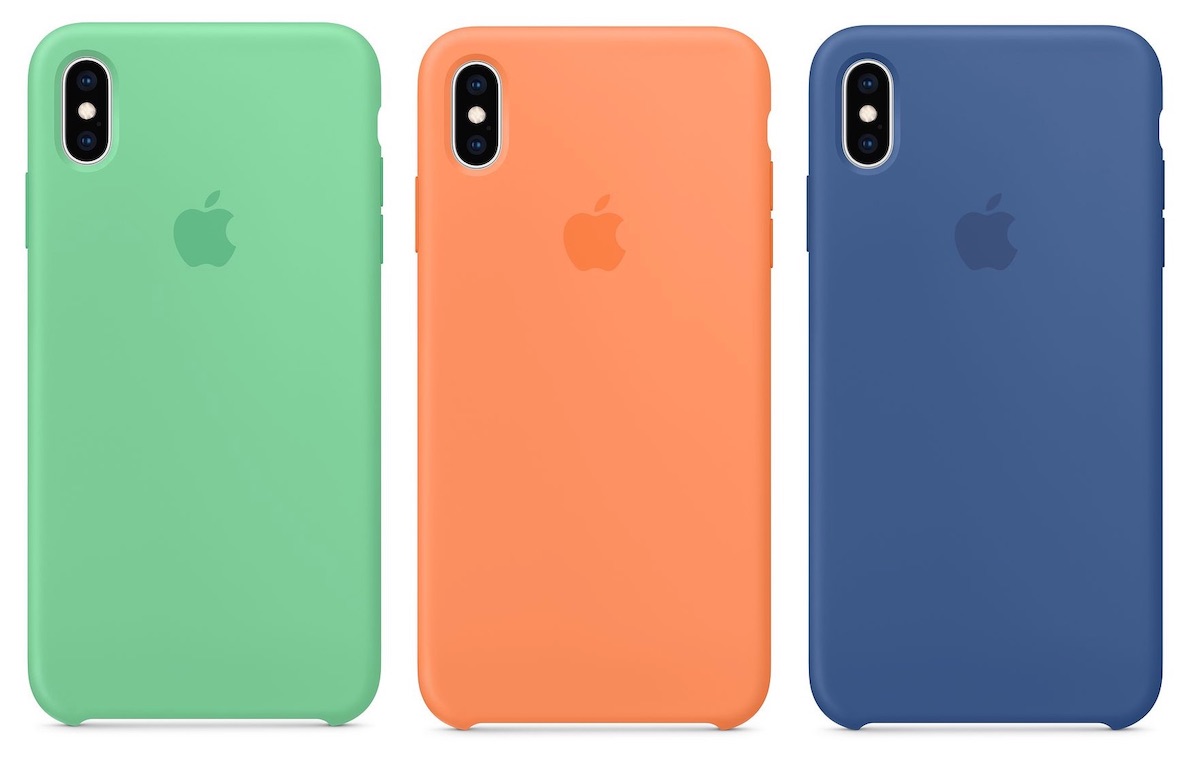
Alongside the second generation of AirPods, Apple today refreshed its iPhone case and Apple Watch band lineup for spring. In Silicone cases for iPhone XS and iPhone XS Maxyou can now choose from Spearmint, Papaya, and Delft Blue.


The iPhone XS Smart Battery Case is now available in a Pink Sand color option, after first launching in just White and Black.


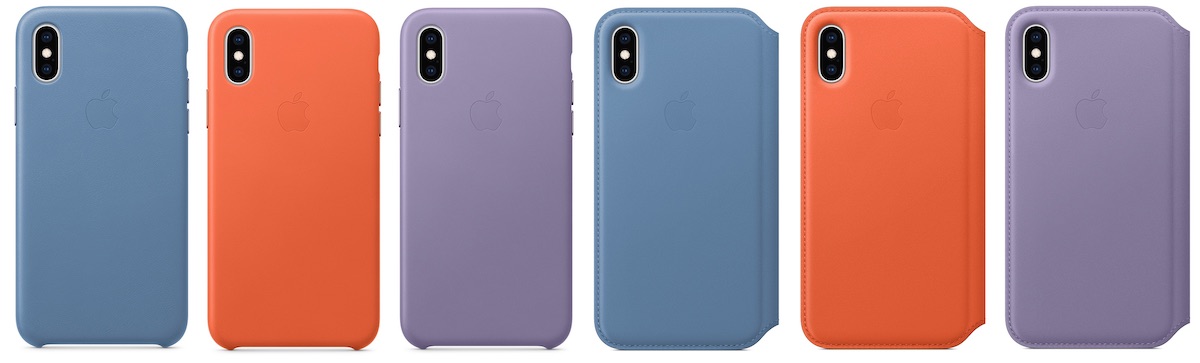
iPhone XS Leather Cases are gaining Cornflower, Sunset, and Lilac. The same colors can be found for iPhone XS Max Leather Cases, iPhone XS Leather Folio, and iPhone XS Max Leather Folio.


Apple Watch Sport Bands are also matching the new iPhone case colors in Spearmint, Delft Blue, and Papaya. You can get these in 40mm or 44mm to fit all previous generations of Apple Watch and Apple Watch Series 4.


In Sport Loop there is Papaya, Cerulean, Spearmint, and Lilac as well. Just like Sport Bands, these are available in both 40mm and 44mm sizes.


The Nike Sport Band lineup also updated with Black/Hyper Grape, Spruce Fog/Vintage Lichen, and Teal Tint/Tropical Twist. These bands are made with the same fluoroelastomer as Apple's Sport Bands.


There are also new Nike Sport Loop bands, in Spruce Fog, Teal Tint, Hyper Grape, Summer White, and Black.


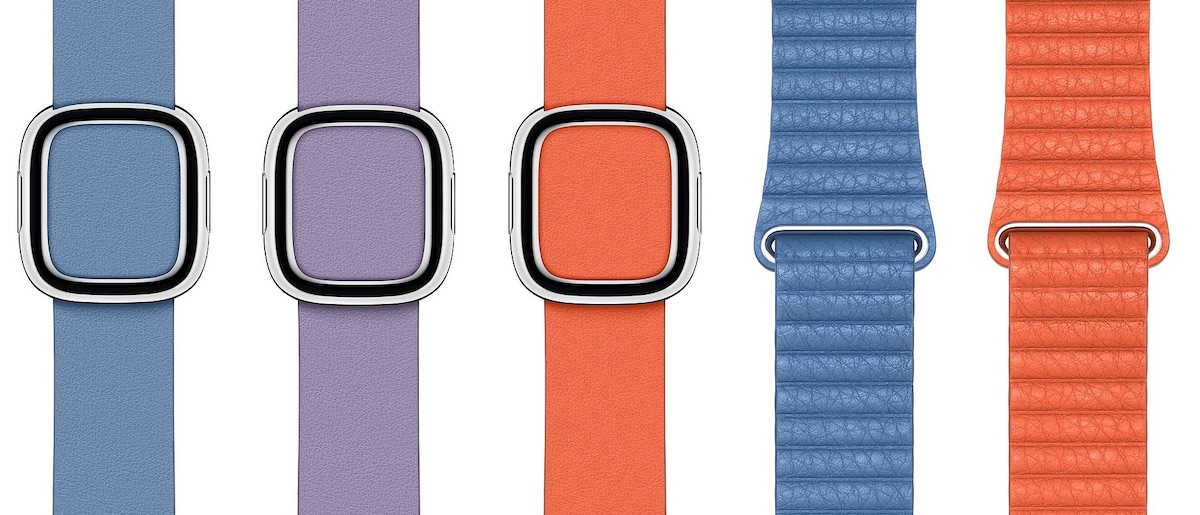
New Modern Buckle colors include Cornflower, Lilac, and Sunset. These join new Leather Loop colors in Cornflower and Sunset as well.


Lastly, new Hermès options include Rose Sakura/Craie/Argile Swift Leather Double Tour, Bleu Lin/Craie/Bleu du Nord Swift Leather Double Tour, and Etoupe Swift Leather Double Tour. Single Tour bands get the same new colorways.


Head to Apple.com to purchase the cases and bands, and check out our post on the second generation of AirPods for more information on Apple's latest wireless headphones.

Also Read:jihosoft Free iPhone Data Recovery

Sponsor ads:

Gihosoft Free iPhone Data Recovery:https://www.gihosoft.com/iphone-data-recovery-free.html

Gihosoft iPhone Data Recovery Free

Free iPhone Data Recovery Software for Windows/Mac

Recover up to 12+ types of files, including contacts, SMS, photos, WhatsApp, Viber, notes, etc.

Restore lost data from iOS devices directly or from iTunes and iCloud backup

Recover iPhone data lost due to iOS upgrade/jailbreak, accidental deletion, device lost or broken

Support all the latest iPhone, iPad and iPod Touch

Both Free and Pro version.

If you lost data after you updated to a new iPhone, you can always use Gihosoft iPhone Data Recovery to get the data back from the old iPhone or backup.You may also like: iphonerecovery.com

If you use android phones, please choose Gihosoft Android Data Recovery.

With Gihosoft Android Data Recovery, no longer afraid of data loss!

Must read:Youtube video downloader for pc

Gihosoft RePicvid Free Photo Recovery Software provides a free photo recovery software for windows to help users recover the deleted or lost photo for free.

Jihosoft Android Data Recovery: the best Android Data Recovery software for Windows and Mac to recover deleted contacts, messages, photos, videos, WhatsApp and etc from Android devices.Tips:How to transfer messages from iPhone to iPhone


Jihosoft File Recovery:Recover deleted, Lost, formatted, or corrupted files from PC, flash drive and memory card easily & safely
Friday, 1 March 2019

Does a Factory Reset or iOS Updating Remove Spyware? - Nope!


Does a Factory Reset or iOS Updating Remove Spyware? - Nope!
Factory Reset

A lot of people think that performing a factory reset will remove the spyware from their iPhone. This is not correct. While factory reset does remove all your data including the spyware app(s) from the device, there is still a possibility that the spyware will be installed again. The reason behind this is that the usual factory reset does not remove data permanently and some remnants of the stubborn spyware app still remain when you reset the device.

Another reason is that most people backup their iDevices before resetting them. When the data is backed up, the spyware app also gets backed up to iCloud or iTunes. And when you restore from that backup, the parts of the spyware app are also restored. Hence you are likely to find these remnants of the spyware app if you rescan the device with a spyware scanning software.
iOS Updating

Updating your iPhone’s firmware also has a similar effect. However, it is relatively less extreme. Your data and apps are not removed during a firmware update, but there are chances that the spyware will be removed.Also Read:How to Access and Unlock Android Phone with Broken Screen
Also Read:Top 7 Best Websites to Convert AVI to MP4 Free Online 2019

Easy Ways to Download/Save Tumblr Videos or Gifs on iPhone

Easy Ways to Download/Save Tumblr Videos or Gifs on iPhone

Millions of Tumblr users share videos, stories, and photos on Tumblr on a daily basis. Given that a lot of people are sharing their updates on the feed every minute, interesting videos can quickly roll down the feed and get out of your sight. This is the reason as to why people who use iPhone wonder whether it is possible to save these videos on their device for future reference. One thing to note about Tumblr is that it does not include an inbuilt way that can allow its users to download videos on iPhone. However, don’t worry, in this article, we will be guiding you on how to save/download videos from Tumblr to iPhone.
Method 1: Download Tumblr Videos or Gifs Using Third-Party Tools

There are third-party tools available that can help you save your favorite Tumblr to your iPhone. One popular tool is DreDown. This method does not require you to have Jailbreak and will work on any iPhone. The only thing you need to do before you can use this method is connect your iPhone to both your computer and iTunes. This method is not complicated. To download your favorite videos from Tumblr using DreDown, follow the steps below:

Step #1: Choose the video you wish to download on Tumblr.

Step #2: Copy the URL for the video.

Step #3: Open a new tab and then visit http://www.dredown.com/tumblr. Paste the video URL you copied in Step #2 above in the text box and click the DreDown button.

Step #4: The Video will be downloaded and saved to your Computer in MP4 format. You can either enjoy watching your video on your computer or you can easily use iTunes to import the video to your iPhone.


Method 2: Save Videos from Tumblr to iPhone/iPad with Jailbreak Tweaks

If your iPhone already has Jailbreak, things become even easier. You will have the ability to download your favorite Tumblr videos using Dwnldr and save them to your iPhone. You can access this Cydia tweak quite easily from the BigBoss repository. With Dwnldr, you will be able to download and save Tumblr videos to your iPhone camera roll. This method is not complicated either. Follow the steps below:

Step #1: Open Cydia on your iPhone and go to the BigBoss repository.

Step #2: Search for Dwnldr and then purchase it.

Step #3: Install Dwnldr and then Restart your Device.

Step #4: Launch your Tumblr application and then select a video you would like to download and save.

Step #5: Tap the selected video and keep holding it. You should see a popup that offers you two choices: Dwnldr video vault or Save Videos on your iPhone Camera Roll.

Step #6: Choose the Camera Roll option and your video will be downloaded and saved to your iPhone camera roll where you can find it later.
Method 3: How to Save Tumblr Videos to iPhone/iPad without Jailbreak or Tools? (Screen Recording)

For this method to work perfectly, you will need to have an iPhone that is running on iOS 11 or later. iOS 11 offers new recording features which allow you to record your screen in the best audio and video quality. To record your video and save it on Tumblr, follow the steps below:

Step #1: Tap the screen recorder icon.

If you are using iPhone X, you can locate the screen recorder control center by swiping your finger down starting at the top-right corner of your screen. If you are using an iPhone 8 or earlier, scroll up using your finger on the home or lock screen.

Step #2: The screen recorder should start recording in 3 seconds.

This gives you the time to start the video you wish to record. Make sure that you play your video in full-screen mode. This will allow you to save it in HD quality. Avoid turning on other sounds since these will also get recorded by the screen recorder together with the Tumblr video sounds.

Your voice and other external sounds will not get recorded if you don’t use an external microphone or Apple earpiece. To stop the screen recording, tap on the red button that shows recording time on the top left of your screen and then confirm on the popup that appears.

Step #3: Edit your video.

After recording, you can edit your video. For example, you may want to trim unused video portion. To edit your video, locate your recorded video in Cameral roll and then tap on Edit.


Extra Tip: How to Save Tumblr Videos on MacBook Pro/Air?

There are two methods you can use to download Tumblr videos to your MacBook Pro/Air. These are either using a software or using a browser extension. Let’s look at these methods:
Using a Software

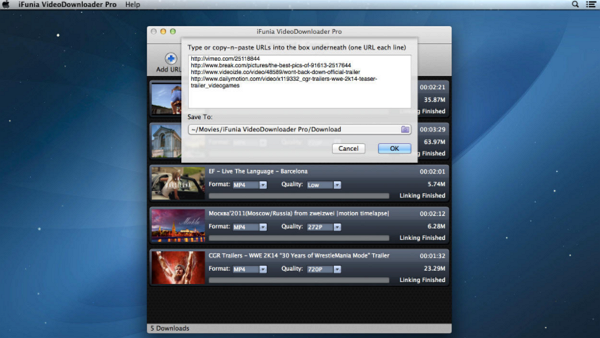
A popular and free software you can use is the iFunia Video Downloader. Therefore, download and install it before proceeding. Follow the steps below to download Tumblr videos using iFunia Video Downloader.

Step #1: Run the software.

Step #2: Locate the video you would like to download on Tumblr. Click share icon and then the permalink option. You will get redirected to a new Tumblr page. Copy the URL for the page and go to your iFunia video downloader. The URL gets automatically pasted in iFunia URL box. You can copy and paste more URLs for bulk download.

Step #3: Select the format and preferred video quality. By clicking the arrow down icon, you will start the download.


SummaryAlso Read:How to Access and Unlock Android Phone with Broken Screen
Also Read:Top 7 Best Websites to Convert AVI to MP4 Free Online 2019

Although Tumblr does not include an option that allows users to download and save their favorite videos to iPhone, it is still something you can do. In this article, you will find various methods telling you how to save/download videos from Tumblr to iPhone. The methods are both safe and have been proven to work. Don’t let your favorite video get lost down Tumblr timeline. Download it and save it instead.Sponsor ads:

Gihosoft Free iPhone Data Recovery:https://www.gihosoft.com/iphone-data-recovery-free.html

Gihosoft iPhone Data Recovery Free

Free iPhone Data Recovery Software for Windows/Mac

Recover up to 12+ types of files, including contacts, SMS, photos, WhatsApp, Viber, notes, etc.

Restore lost data from iOS devices directly or from iTunes and iCloud backup

Recover iPhone data lost due to iOS upgrade/jailbreak, accidental deletion, device lost or broken

Support all the latest iPhone, iPad and iPod Touch

Both Free and Pro version.

If you lost data after you updated to a new iPhone, you can always use Gihosoft iPhone Data Recovery to get the data back from the old iPhone or backup.You may also like: iphonerecovery.com

If you use android phones, please choose Gihosoft Android Data Recovery.

With Gihosoft Android Data Recovery, no longer afraid of data loss!

Must read:Youtube video downloader for pc

Gihosoft RePicvid Free Photo Recovery Software provides a free photo recovery software for windows to help users recover the deleted or lost photo for free.

Jihosoft Android Data Recovery: the best Android Data Recovery software for Windows and Mac to recover deleted contacts, messages, photos, videos, WhatsApp and etc from Android devices.Tips:How to transfer messages from iPhone to iPhone

jihosoft Free iPhone Data Recovery

Thursday, 28 February 2019

How to Unlock iPad without Passcode


1 Unlock iPad without Passcode with iTunes

Here we will show you how to unlock the iPad by using iTunes which is quite possible to do for all iOS users because they are already familiar with.


Begin by launching the latest version of your iTunes which is on mac or windows that depend on the platform that you are using, if you don’t have the latest version of iTunes go the download it.


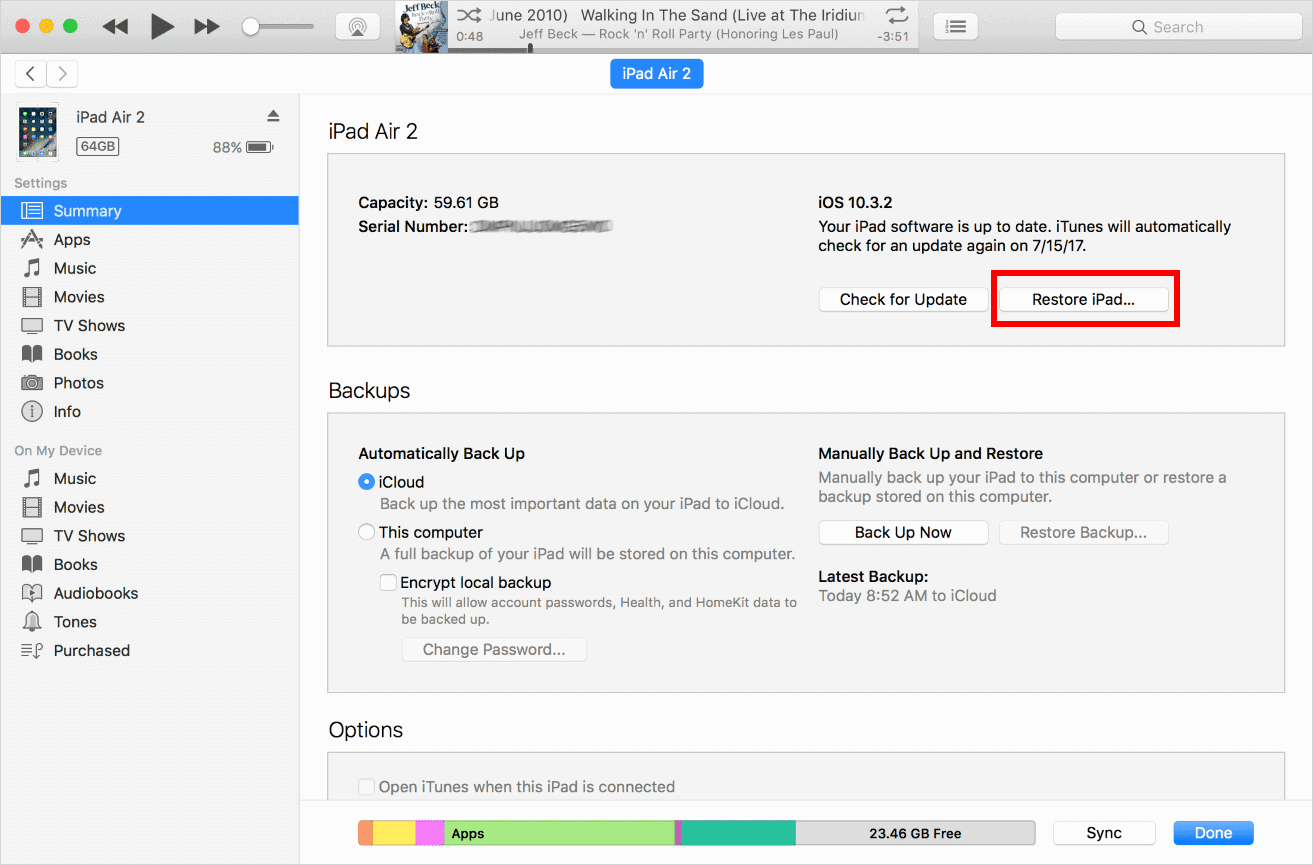
Your iPad will get detected by the iTunes, now you can select it from the devices section and then go to the Summary page


You should by able to see "Restore iPad" option which is available on the right side of the panel.


Just confirm your choice and wait for iPad to get restored.


2 Unlock iPad without Passcode using Find My iPhone

Apple introduced my iPad/iPhone application with only one purpose which is making it easier for the users to locate their device remotely. And by doing the following steps you can easily by able to unlock the iPad without passcode.


With your Apple ID you should go to iCloud website and log in. of course make sure that you use the same account which is associated with your iPad that you need to restore.


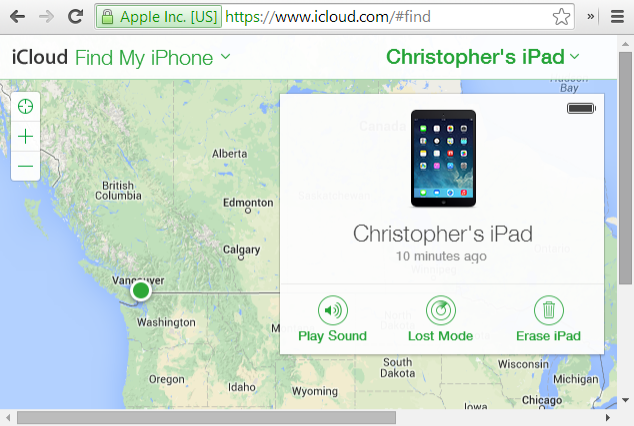
You will see the option of find phone through the welcome screen of iCloud.


Now you will see a new interface. Click on the all devices option in front of you and simply select your iPad.


The options that associated with your iPad should now by available in front of you. And to unlock your device, click one "Erase iPad" button.


Wait for your iPad to be erased after conforming your choice.


3 Unlock iPad without Passcode in Recovery Mode

This is the last resort in front of you of none of the above-mentioned methods succeeded in unlocking the iPad which is very rare. Without a further do let’s get started.

1. Launch the latest version available on your computer or Mac.

2. You should turn off the device “iPad” and leave for a few seconds to rest.

3. By holding the power button and the home button at the same time you can put your iPad in the recovery mode. Just keep pressing the buttons for at least 10 seconds. Then you will see the apple logo on the screen.

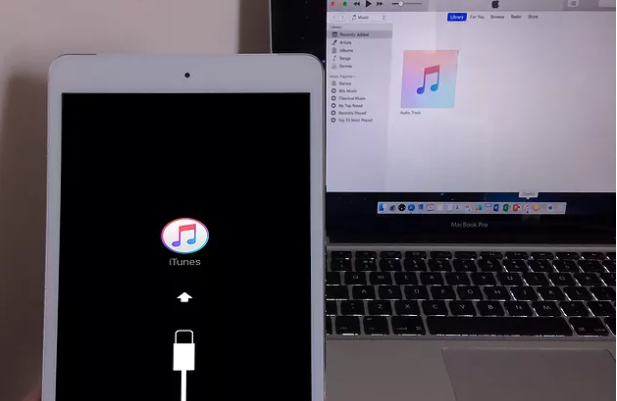
4. By still holding the home button and letting go of the power button. Try to connect your iPad to the computer or mac depending on what you are using then it should display iTunes symbol


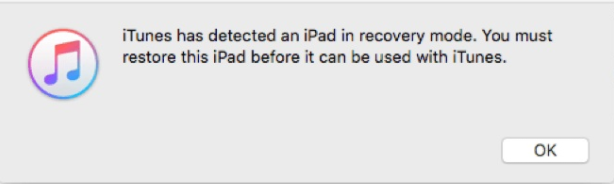
5. After connection your iPad to the iTunes. It will detect that your iPad is in the recovery mode.

6. A message will appear in front of you tells you that your iPad is detected in recovery mode and you should restore it before you can use it. Just click "OK" and it will be automatically recovered.


The best way on how to unlock iPad without passcode is to get help from iMyFone LockWiper, which can solve it within minutes. Even though there are other methods to unlock your iPad like using iTunes, iCloud or the Recovery mode, these are not recommended to users due to their limitations.

If you want to unlock your iPad safely and quickly, download iMyFone LockWiper Windows version or Mac version and let it handle the problem for you.Also Read:XD Card Recovery – Recover Deleted Photos from xD-Picture Card
Also Read:How to Convert SWF to MP4 on Mac or Windows
Also Read:7 Best iPhone Photo Editor Apps To Achieve Filter and Psychedelic Look
Also Read:5 Best Free Movie Streaming Sites like Pubfilm to Watch Movies Online 2019

How to Send Ringtones to iPhone through Email?


How to Send Ringtones to iPhone through Email?

Every iPhone user would welcome the idea of having a perfect alternative that allows them send ringtones to their iPhone – whether it is from their computer or another iPhone. Although sending ringtones via email is an old transfer method, it is still a substitute platform to escape the hassles of only making use of iTunes on your iPhone. To achieve this, here are a few detailed, yet practical steps.
From iPhone to iPhoneSponsor ads:Best iOS Emulator For Windows To Build & Run iOS Apps


Login to your email account.


Got to “Compose” to send a new e-mail and make yourself the recipient of the mail. Before saving or downloading the file, first ensure it is in M4R format. Click on your preferred ringtone file and save the file by downloading it.


Go to the ringtone file you want to set on your iPhone, upload it as an attachment, and send the e-mail.


Sign into your email account on your iPhone and download the attached file.
From computer to iPhone


Go to your browser and sing into your email account from your computer.


Connect your phone to your computer with a USB cord and open iTunes on your device.


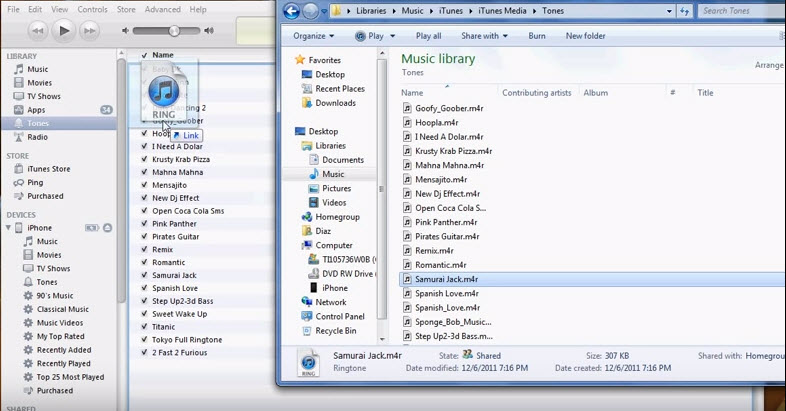
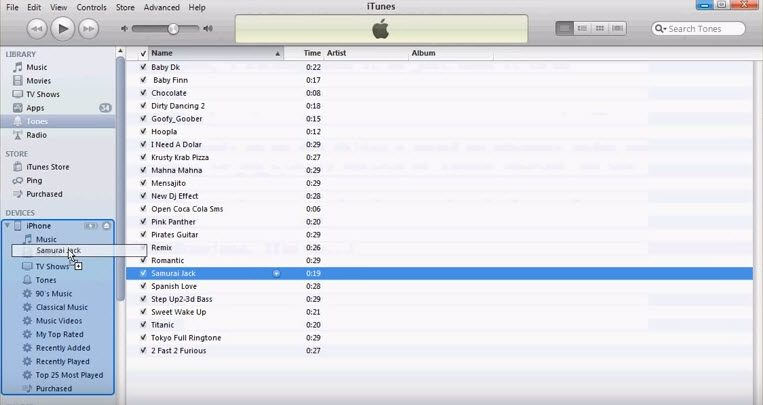
Go to the folder where you already saved the ringtone file and move it to the iTunes Library section at the upper left hand corner of your computer. Ensure the ringtone file is moved to the “tones” subcategory.


Move the ringtone file from iTunes to the “Devices” section of your iPhone. Your selected ringtone will automatically sync to your iPhone immediately the file is moved.


All in all, iMyFone TunesMate is a perfect alternative to the email method to send ringtones to iPhone.


Sponsor ads:

Gihosoft Free iPhone Data Recovery:https://www.gihosoft.com/iphone-data-recovery-free.html

Gihosoft iPhone Data Recovery Free

Free iPhone Data Recovery Software for Windows/Mac

Recover up to 12+ types of files, including contacts, SMS, photos, WhatsApp, Viber, notes, etc.

Restore lost data from iOS devices directly or from iTunes and iCloud backup

Recover iPhone data lost due to iOS upgrade/jailbreak, accidental deletion, device lost or broken

Support all the latest iPhone, iPad and iPod Touch

Both Free and Pro version.

If you lost data after you updated to a new iPhone, you can always use Gihosoft iPhone Data Recovery to get the data back from the old iPhone or backup.You may also like: iphonerecovery.com

If you use android phones, please choose Gihosoft Android Data Recovery.

With Gihosoft Android Data Recovery, no longer afraid of data loss!

Must read:Youtube video downloader for pc

Gihosoft RePicvid Free Photo Recovery Software provides a free photo recovery software for windows to help users recover the deleted or lost photo for free.

Jihosoft Android Data Recovery: the best Android Data Recovery software for Windows and Mac to recover deleted contacts, messages, photos, videos, WhatsApp and etc from Android devices.Tips:How to transfer messages from iPhone to iPhone


jihosoft Free iPhone Data Recovery